Markhub vs Slack
Team chat in Slack. Customer chat somewhere else.Markhub puts both in one place, and AI finishes the work.
Questions from your website chat, Instagram, Messenger, LINE and WeChat land in the same channels your team already works in. Teammates and AI agents answer in one place, turn requests into tickets, and see them through.
Slack is great for team conversation, but customer questions live in another tool and agent output scrolls away. Markhub opens a conversation per job, turns it into a ticket, and lets MAKi and the Claude Code or Codex on your computer finish the work like teammates.
Customer questions and team chat, in one place
With Slack, answering customers means running a separate support tool. With Markhub, wherever a customer reaches you, it lands in the channel where your team already works.
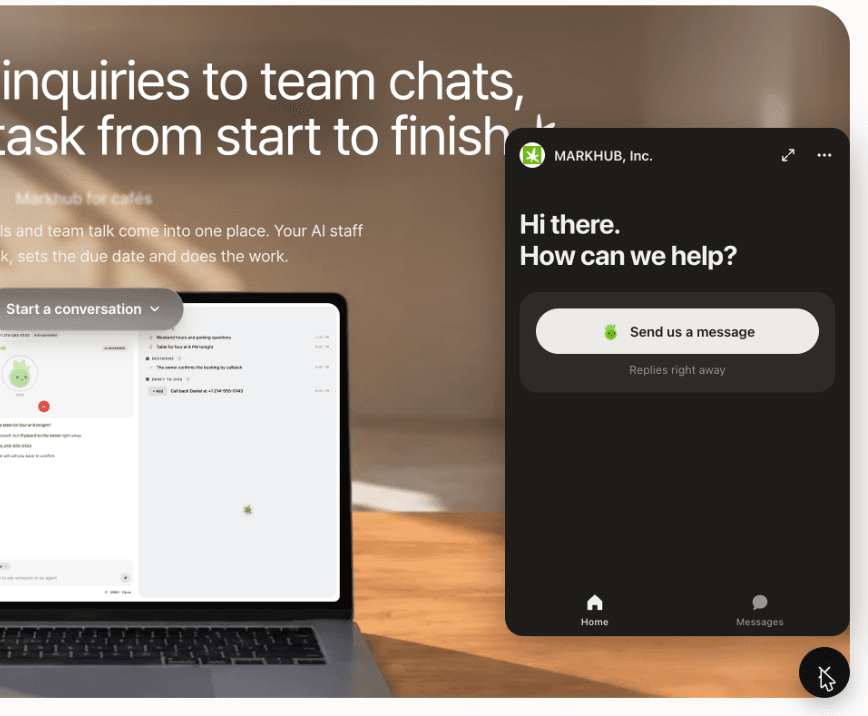
Chat on your website
Add a chat window to your website. Visitor questions go straight to your team channel, and a teammate or MAKi answers from there.
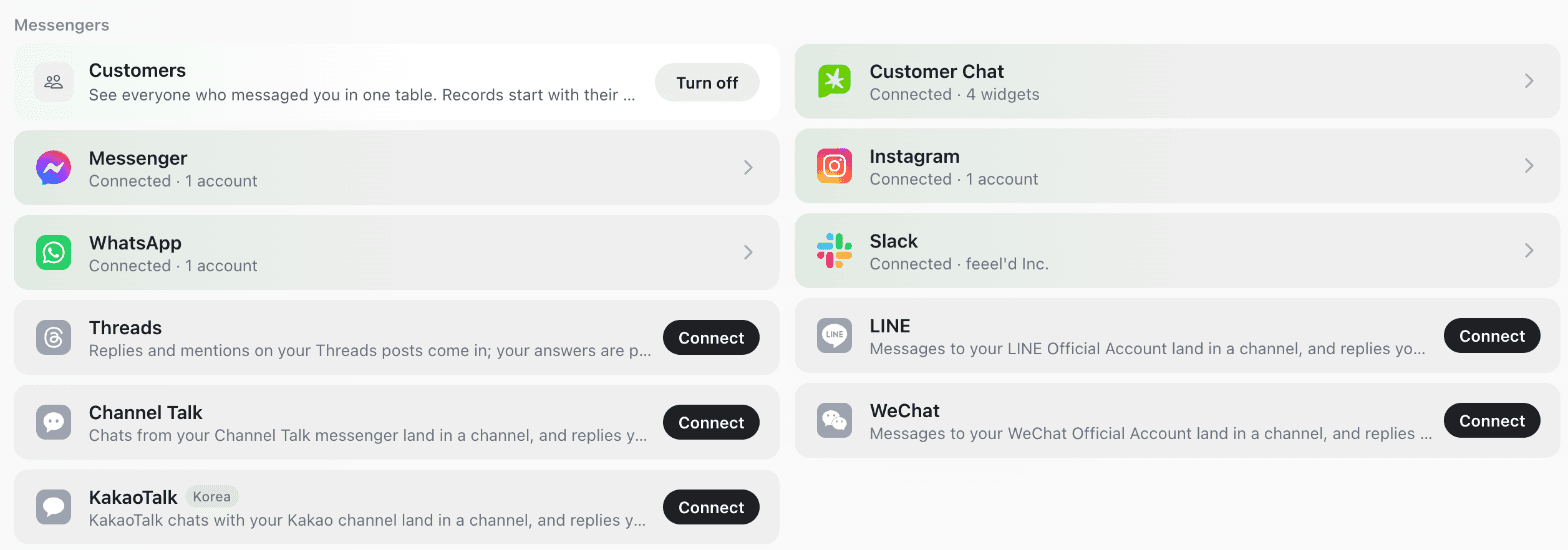
Instagram, KakaoTalk, LINE, WeChat
Connect Instagram DMs, KakaoTalk, Facebook Messenger, LINE, WeChat or WhatsApp, and customer messages arrive in Markhub. Reply right there. No separate support inbox to keep open.
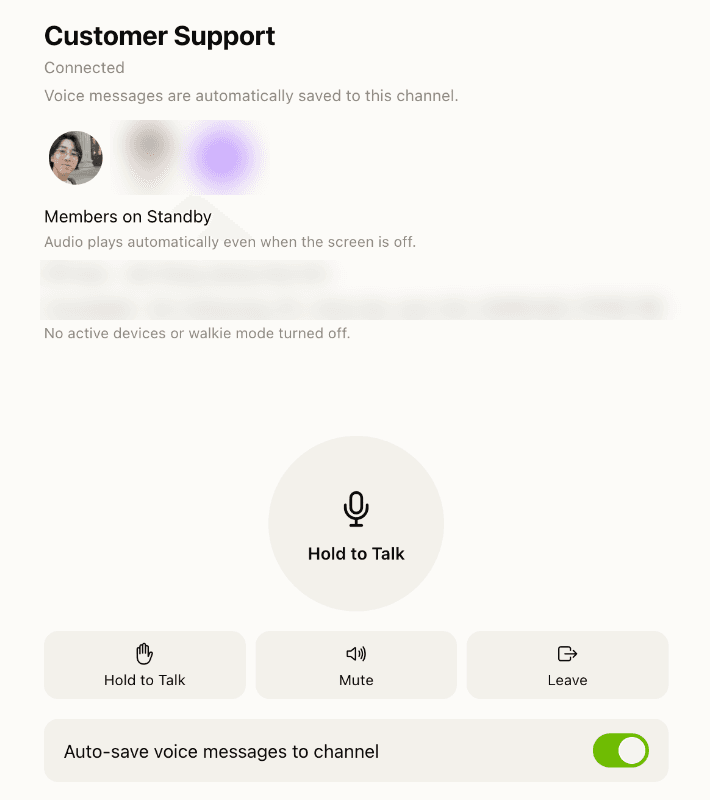
A walkie-talkie for your team
Hold the button and talk, and everyone in the hub hears you right away. Each message is saved in the hub as a voice note, so anyone who missed it can catch up.
Where a Slack channel stops working
One channel, ten jobs
A Slack channel carries many jobs at once, so an agent reading it gets everyone’s context mixed together. In Markhub, the first line you type opens a conversation for one job, so an agent only sees what belongs to that job.
Agent work scrolls away
When an agent finishes in Slack, the result is just another message, and checking whether the job got done is on you. In Markhub, a conversation becomes a ticket in one click, with an owner, a due date and a status. Assign it to an agent and the agent works it and closes it.
Every agent in a different app
Slackbot lives in Slack. Coding agents live in terminals and cloud consoles. In Markhub, MAKi, Claude Code and Codex are members of the same workspace, and you hand them work the way you would a teammate, even from your phone.
Acme
# general
# team
# support
# dev
Apps
Claude
# team
Jiwoo9:02 AM
Can someone update the pricing page copy?
Min9:04 AM
Customer on order #4821 wants a refund
3 replies
Jiwoo9:05 AM
@Claude can you look at the signup bug?
ClaudeAPP9:11 AM
I looked into the signup bug. On Safari the…
Alex9:14 AM
Who has the refund? And the pricing copy?
Three jobs in one stream. The agent’s answer lands between them.
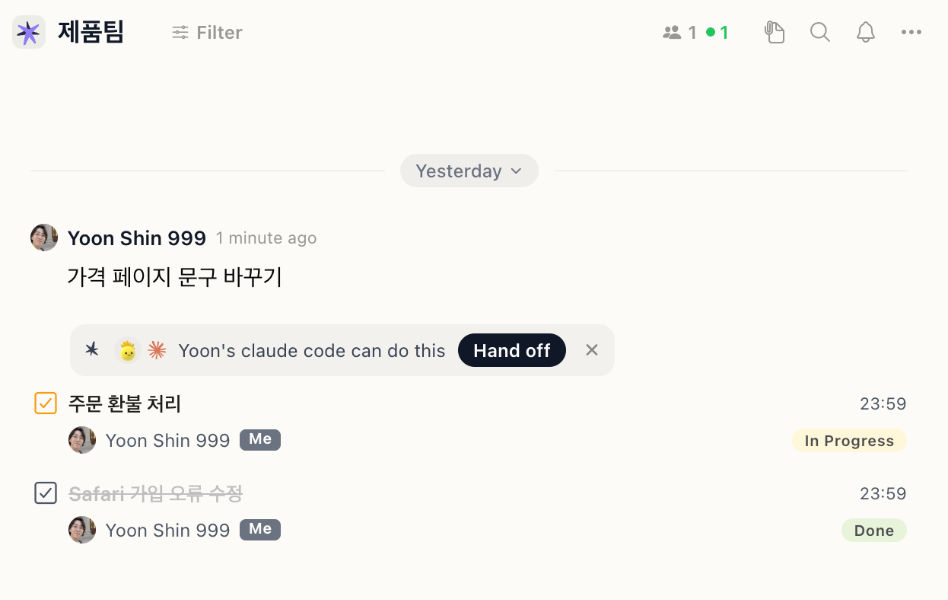
Every first line is its own conversation, with its own status.
Acme
# general
# team
# support
# dev
Apps
Claude
# team
ClaudeAPP9:41 AM
Done! Opened a PR for the signup fix.
Min9:44 AM
Lunch plans?
6 replies
Alex9:46 AM
Refund is handled
Jiwoo10:20 AM
Wait, did the signup bug ever get fixed?
The result is one more message. Remembering whether it shipped is on you.
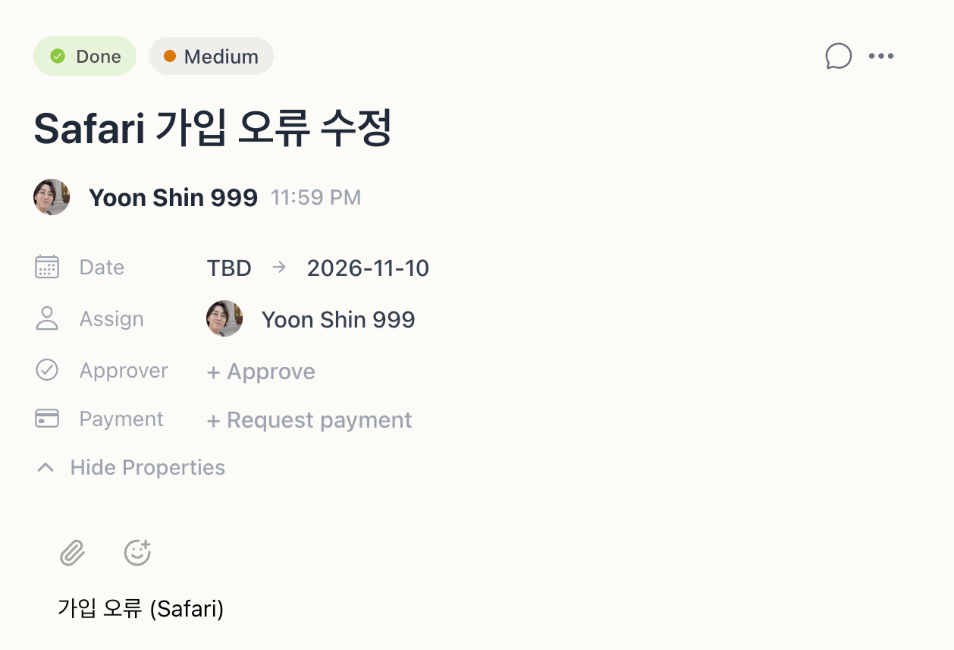
The ticket moves to Done, with the pull request attached.
Workplace AI is not where the real work happens
Workplace assistants, Slackbot and our own MAKi included, are built to coordinate: search, summarize, keep things moving. For deep work like writing code, editing files and finishing long tasks, nothing built into a messenger comes close to Claude Code and Codex today. So Markhub does not make you choose. MAKi runs the workspace, and the agent you already pay for does the heavy lifting.
| Slackbot (Slack Business+) | MAKi (built into Markhub) | Claude Code · Codex in Markhub | |
|---|---|---|---|
| Search and summarize the workspace | Across channels, files and canvases | Conversations, notes, meetings | Reads Markhub through built-in tools |
| Turn chat into tracked work | Drafts canvases and lists | Suggests to-dos from chat, tracks tickets | Picks up assigned tickets and closes them |
| Answer phone calls | No | Answers, transcribes, posts to-dos | No |
| Use a real browser with your logins | Web search | On the Mac app, asks before sending | On your own computer |
| Write code, run tests, open pull requests | Not its job | Not its job | The best at it today |
| Work in your files, apps and dev server | No | No | Inside the work folder you choose |
| Price | Requires Business+, $15/user/mo | Included in Team, $10/seat/mo | Your existing Claude or ChatGPT plan |
Slackbot capabilities are based on Slack’s public announcements as of November 2026.
Claude Code and Codex: Slack vs Markhub
Both Anthropic and OpenAI ship Slack apps. They work, but they are built for admins and cloud repositories. In Markhub, each person connects the agent on their own computer in a few clicks.
Acme
# general
# app-requests
# support
# dev
Apps
Claude
# app-requests
Waiting for admin approval
Jiwoo requested the Claude app. A workspace admin needs to approve it.
GitHub repository
Routing mode
Type /invite @Claude in each channel
Admin approval, a GitHub repository, routing, then channel invites.

One screen, three checks. It runs on your own computer.
Claude Code in Slack
5 steps- 1A Slack admin installs the Claude app from the Marketplace
- 2Each person links their Claude account
- 3Connect GitHub at claude.ai/code and authorize a repository
- 4Pick a routing mode (code only, or code + chat)
- 5Invite Claude into each channel. Channels only, no DMs
Runs in Anthropic’s cloud on GitHub repositories. Your own files, dev server and logged-in apps stay out of reach.
Codex in Slack
5 steps- 1A ChatGPT workspace admin sets up the Slack deployment
- 2The admin turns on Codex cloud for Slack
- 3The admin publishes a shared cloud environment for the repository
- 4Each person connects their own account
- 5Mention @ChatGPT in an internal channel
Runs in OpenAI cloud environments your admin publishes. Not on your computer, and not in channels shared with other companies.
Claude Code or Codex in Markhub
3 steps- 1In the Markhub Mac app, click “Connect an agent on this computer”
- 2Not installed yet? Click Install, then sign in with your browser
- 3Pick a work folder. Done
Runs on your own computer, with your files, your tools and your logins. No admin, nothing to paste. Once connected, hand it work from any conversation, even from your phone.
And everything else Slack leaves to other tools
Meetings turn into to-dos as you talk
Markhub records and transcribes the call, and Live Context pulls out topics, decisions and to-dos while the meeting is still going.
MAKi picks up the phone
When nobody can answer, MAKi takes the call, writes down what the caller needs, and posts it to the team as a to-do.
Solo or with a team
Start alone with MAKi and the agent on your computer, then invite teammates when you are ready. Unlimited members on every plan.
What a 10-person team pays
To get AI comparable to MAKi in Slack, you need Business+. Here is the same team on both, billed annually.
Slack Pro
$870
per year · $72.50/mo
Basic AI only
Slack Business+
$1,800
per year · $150/mo
AI included
Markhub Team
$1,200
per year · $100/mo
MAKi with no daily caps, every meeting summarized, 600 AI call minutes
With AI on both sides (Business+), a 10-person team saves $600 a year, and a 30-person team saves $1,800. Fold in the support, meeting-notes and issue-tracking tools you pay for next to Slack, and the gap grows.
Run your own numbers
Slack plan
Billing
Tools you pay for next to Slack (monthly total, optional)
You save per year
$600
List prices from slack.com/pricing and markhub.ai/pricing, November 2026. Excludes Slack promotions and Markhub AI call minutes beyond the 60 per seat included in Team.
When Slack is still the better fit
- Your daily work runs on many Slack app integrations that have no equivalent elsewhere.
- You share a lot of channels with other companies through Slack Connect.
- You are an organization of hundreds with Enterprise Grid admin and compliance needs.
Moving over without a big bang
- 1Keep Slack connected as a tool in Markhub, and start with one job, like customer calls or one project, next to it.
- 2When you are ready, upload a Slack export and bring channels into Markhub hubs with their history.
Frequently asked questions
- Is Markhub a Slack alternative?
- Yes. Markhub has the real-time team chat you use Slack for, and adds conversations that become tickets, a built-in AI employee called MAKi, and one-click connections to Claude Code and Codex on your computer.
- Can we use Markhub and Slack at the same time?
- Yes. You can connect Slack as a tool in Markhub and move one job at a time. Many teams start with calls or a single project before moving channels over.
- Can we bring our Slack history?
- Yes. Upload a Slack export (JSON), choose the channels, and pick the Markhub hub each one goes into.
- Do I need a Claude or ChatGPT subscription?
- Only for Claude Code or Codex. MAKi is built in and needs nothing extra. If you already pay for Claude or ChatGPT, Markhub lets you use that agent with your team instead of paying for another AI.
- Is there a free plan?
- Yes. The Free plan has unlimited members and hubs with a daily MAKi allowance, and every paid feature is free for 14 days with no credit card.
Start next to Slack. Move when it clicks.
Every paid feature is free for 14 days, no credit card required. Start alone, then invite your team.